Voice Messages: Now Silent‑Mode Friendly
Jan 28, 2026
Voice Messages are already one of the most natural ways to communicate, quick to record, rich with tone, and perfect for saying more than a text ever could. But sometimes listening is not convenient. Maybe you are in class, on the bus, in a meeting, or you simply do not want your volume on.
Now, you do not have to.
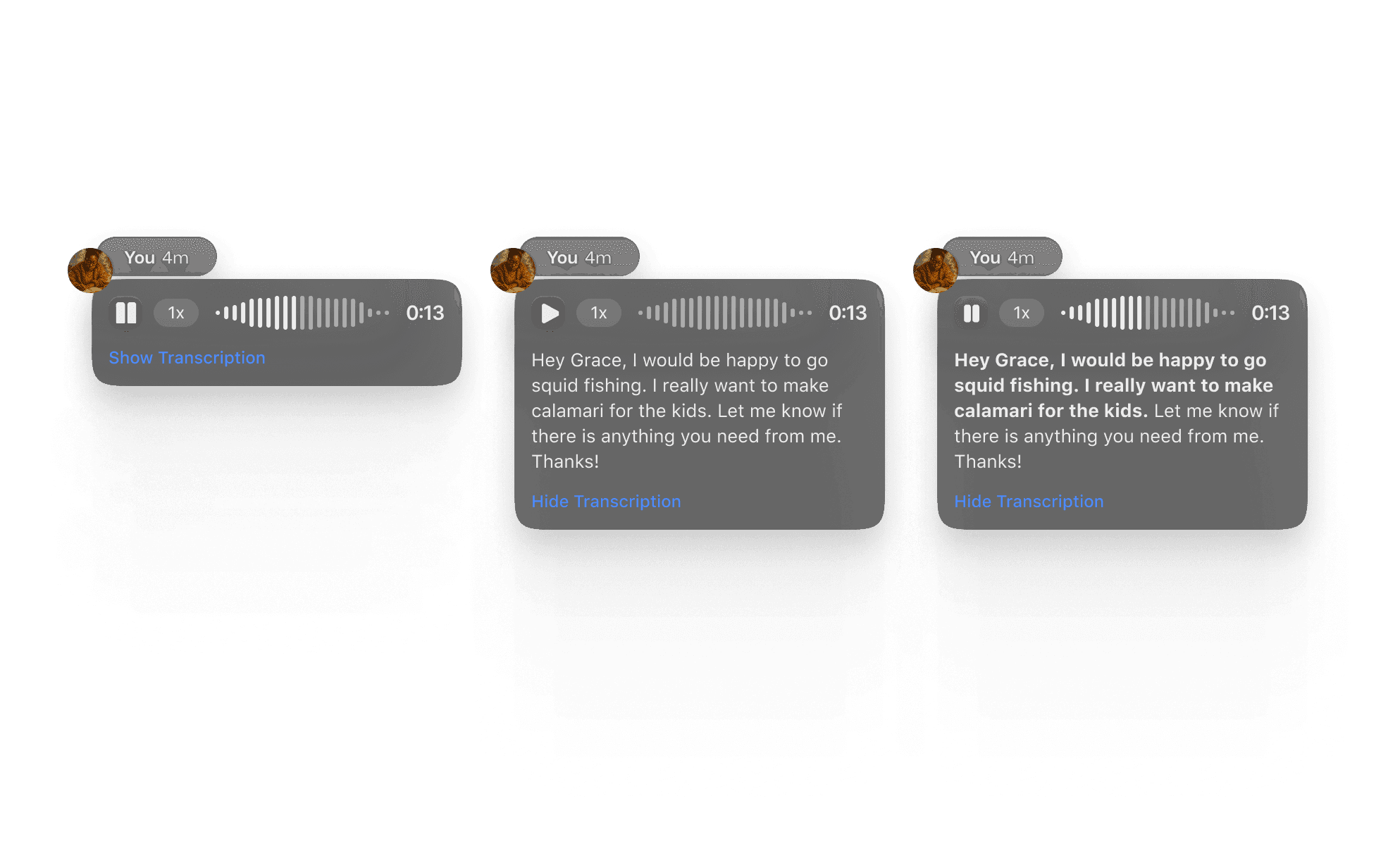
We have added automatic transcriptions to every Voice Message you receive, making it easier than ever to keep up with your conversations. No headphones needed.
Voice Messages are already one of the most natural ways to communicate, quick to record, rich with tone, and perfect for saying more than a text ever could. But sometimes listening is not convenient. Maybe you are in class, on the bus, in a meeting, or you simply do not want your volume on.
Now, you do not have to.
We have added automatic transcriptions to every Voice Message you receive, making it easier than ever to keep up with your conversations. No headphones needed.
Voice Messages are already one of the most natural ways to communicate, quick to record, rich with tone, and perfect for saying more than a text ever could. But sometimes listening is not convenient. Maybe you are in class, on the bus, in a meeting, or you simply do not want your volume on.
Now, you do not have to.
We have added automatic transcriptions to every Voice Message you receive, making it easier than ever to keep up with your conversations. No headphones needed.

📖 Read your messages when you cannot listen
Whether you are sneaking a peek during a lecture or checking a message in a quiet library, the transcription appears right under the voice memo so you can catch the gist without pressing play.
🔊 No volume? No problem.
Your group chat should not have to wait until you are free. Transcriptions let you stay in the loop even when your phone is on silent.
⚡ Catch up faster
Long Voice Messages become skimmable. Scan the text, decide if you want to listen, and jump right to the moments that matter.
✨ More accessible for everyone
Voice Notes now work for more of your group, whether someone prefers reading, has a hearing difference, or just wants a quick summary.

📖 Read your messages when you cannot listen
Whether you are sneaking a peek during a lecture or checking a message in a quiet library, the transcription appears right under the voice memo so you can catch the gist without pressing play.
🔊 No volume? No problem.
Your group chat should not have to wait until you are free. Transcriptions let you stay in the loop even when your phone is on silent.
⚡ Catch up faster
Long Voice Messages become skimmable. Scan the text, decide if you want to listen, and jump right to the moments that matter.
✨ More accessible for everyone
Voice Notes now work for more of your group, whether someone prefers reading, has a hearing difference, or just wants a quick summary.

📖 Read your messages when you cannot listen
Whether you are sneaking a peek during a lecture or checking a message in a quiet library, the transcription appears right under the voice memo so you can catch the gist without pressing play.
🔊 No volume? No problem.
Your group chat should not have to wait until you are free. Transcriptions let you stay in the loop even when your phone is on silent.
⚡ Catch up faster
Long Voice Messages become skimmable. Scan the text, decide if you want to listen, and jump right to the moments that matter.
✨ More accessible for everyone
Voice Notes now work for more of your group, whether someone prefers reading, has a hearing difference, or just wants a quick summary.
How It Works
Just open any chat with a Voice Message.
You will now see the text appear automatically beneath the audio player.
Tap to listen, read at your pace, or do both, whatever fits your environment .
How It Works
Just open any chat with a Voice Message.
You will now see the text appear automatically beneath the audio player.
Tap to listen, read at your pace, or do both, whatever fits your environment .
How It Works
Just open any chat with a Voice Message.
You will now see the text appear automatically beneath the audio player.
Tap to listen, read at your pace, or do both, whatever fits your environment .
Getting Started with GroupMe
Get the app: Download the GroupMe App or navigate to GroupMe.com
Sign Up or Log In: Go to GroupMe and sign up for an account if you don’t have one. If you already have an account, simply log in.
Create a Group Chat or Event Group: Once logged in, create a new "Event Group". This will be the central hub for all communications about your event.
Invite Members: Send out invites to your community to collect RSVPs for your event. When they RSVP, they'll automatically be added to your event group chat. You can do this directly within the app by sharing a join link or entering in their phone number.
Getting Started with GroupMe
Get the app: Download the GroupMe App or navigate to GroupMe.com
Sign Up or Log In: Go to GroupMe and sign up for an account if you don’t have one. If you already have an account, simply log in.
Create a Group Chat or Event Group: Once logged in, create a new "Event Group". This will be the central hub for all communications about your event.
Invite Members: Send out invites to your community to collect RSVPs for your event. When they RSVP, they'll automatically be added to your event group chat. You can do this directly within the app by sharing a join link or entering in their phone number.
Getting Started with GroupMe
Get the app: Download the GroupMe App or navigate to GroupMe.com
Sign Up or Log In: Go to GroupMe and sign up for an account if you don’t have one. If you already have an account, simply log in.
Create a Group Chat or Event Group: Once logged in, create a new "Event Group". This will be the central hub for all communications about your event.
Invite Members: Send out invites to your community to collect RSVPs for your event. When they RSVP, they'll automatically be added to your event group chat. You can do this directly within the app by sharing a join link or entering in their phone number.