Take Control of System Notifications in Your GroupMe Group Chat
Feb 24, 2026
Your group is growing. New members are joining, people are updating their names, and the chat is buzzing. That's a great thing.
But somewhere between "Jordan joined the group" and "Alex changed the group name," your actual conversation got buried under a wave of system messages. Sound familiar?
We hear you. That's why GroupMe now gives you system notification controls to keep all those updates organized and out of the way. You can collapse system notifications right in the chat, so group updates take up less space and you can focus on the messages.
What Are System Notifications, and Why Do They Matter?
System notifications are the updates that pop into your chat when something changes in your group. Things like:
A new member joining
Someone leaving the group
Name or avatar changes
Admin role updates
Group setting changes
They're useful, especially for admins keeping tabs on who's in the group and what's changing. But in an active chat with dozens (or hundreds) of members, those updates can pile up fast and push real conversations off the screen.
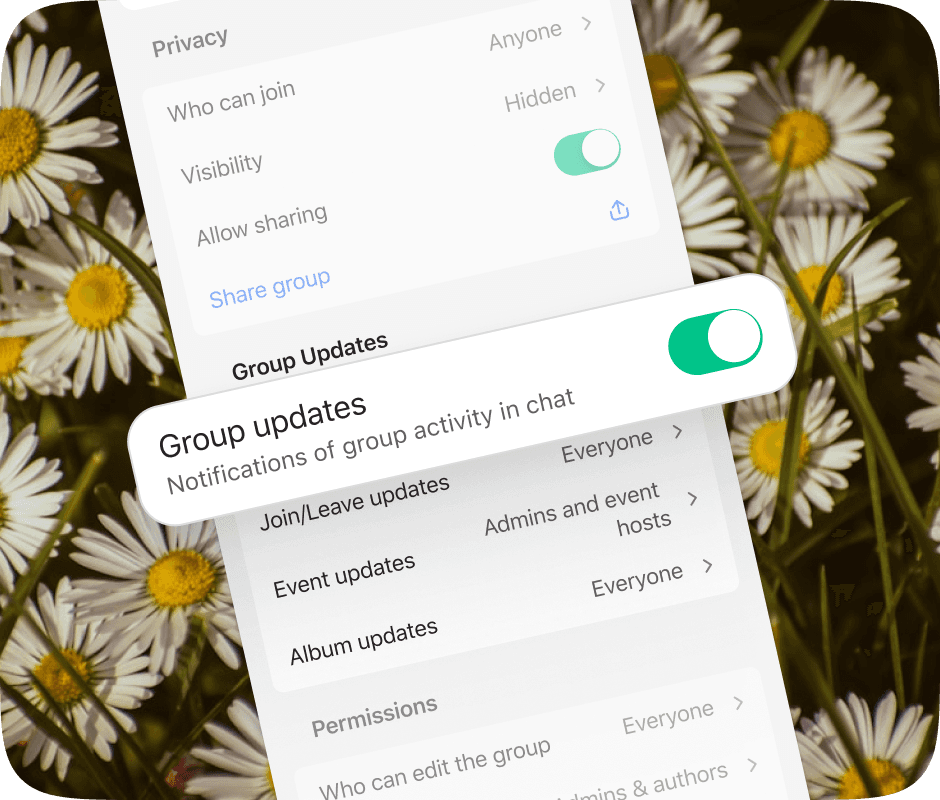
And here's another thing admins will love: when you remove a member from the group, it doesn't blast a notification to the entire chat. No awkward "Jordan was removed" message for everyone to see. It keeps things discreet and avoids unnecessary drama, which is especially important in larger groups where member management is a regular part of keeping things running smoothly.
How System Notification Controls Work
GroupMe's system notification controls give you the power to manage how system messages appear in your chat. Instead of letting updates clutter your main conversation, you decide what stays visible and what gets tucked away.
Here's what that means for you:
Cleaner conversations: Your group chat stays focused on what matters: the actual conversation.
Collapsible notifications: See a cluster of system messages in your chat? Tap to collapse them into a single line. When you need the details, expand them again.
Discreet member removal: Admins can remove members without triggering a group-wide notification, keeping things drama-free.
Easier admin oversight: Admins can manage group updates and member changes without the noise.
Collapse, Expand, Stay in Control
Sometimes you just want to scroll through the conversation without system messages getting in the way. Now you can collapse system notifications directly in your group chat. A batch of "joined" and "left" messages becomes one compact line you can expand whenever you're curious.
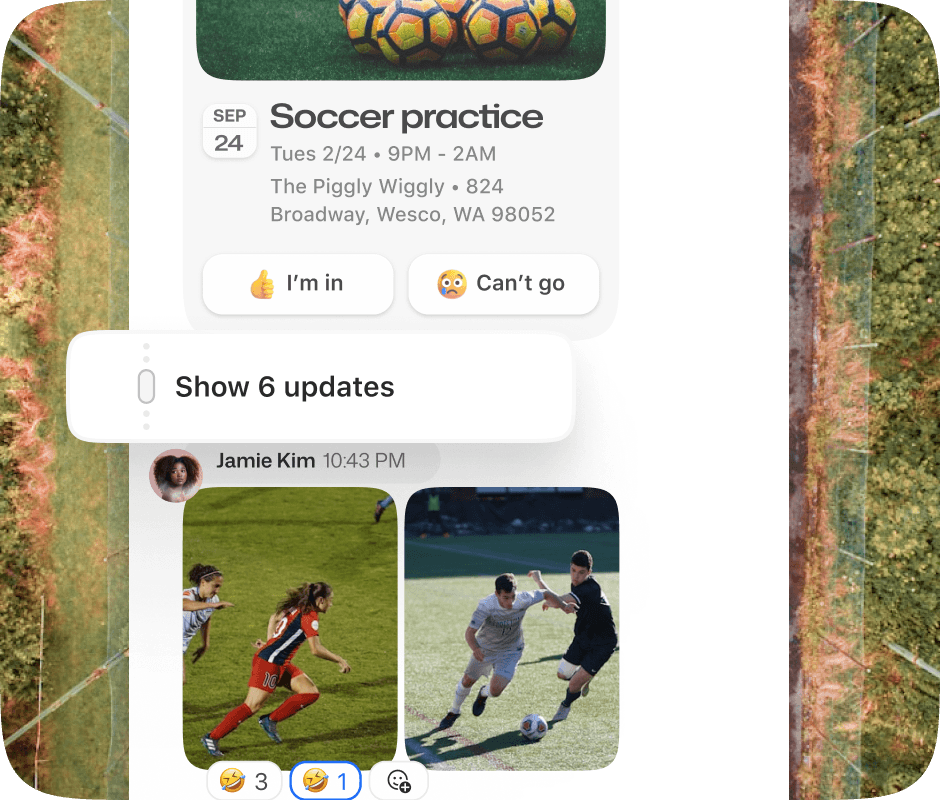
It's a small change that makes a big difference, especially in groups where membership changes happen often.
Group Admins and Community Leaders
If you're running a large group, you know how quickly system messages can stack up. System notification controls give you a clean, focused chat without sifting through hundreds of updates. And when you need to remove a member, the rest of the group doesn't need to know about it.
Busy Group Members
Even if you're not an admin, this update keeps your chat experience smooth. You'll spend less time scrolling past system updates and more time catching up on the messages that matter.
Teams and Organizations
Sports teams, student clubs, faith communities, and family groups all deal with frequent member changes. Now those updates stay organized, so your group communication stays on track.
Tips for Making the Most of System Notifications
For Admins
Collapse to keep the chat tidy. Tap on grouped system notifications to collapse them when you're done reviewing. Your members will thank you for the cleaner scroll.
Remove members discreetly. When someone needs to go, the rest of the group won't see a removal notification. No drama, no awkward questions.
Use it alongside other admin tools. Combine system notification controls with pinned messages and @mentions to keep your group running smoothly.
Monitor group health. A quick glance at recent system notifications tells you if membership is growing, if there's turnover, or if settings have changed.
For Everyone
Enjoy a cleaner chat. Your conversation flow won't be interrupted by system updates anymore.
Collapse what you don't need. Tap to fold system notifications down so you can get back to the good stuff.
Stay in the loop. System notifications are still there when you need them. Just expand the collapsed messages to catch up.
Less Clutter, More Conversation
GroupMe has always been about keeping your groups connected. With system notification controls, we're making sure the conversation stays front and center, even as your group grows and evolves.
Whether you're managing a group of 10 or a community of 1,000, this update helps you stay organized without missing a thing.
Getting Started with GroupMe
Get the app: Download the GroupMe App or navigate to GroupMe.com
Sign Up or Log In: Go to GroupMe and sign up for an account if you don’t have one. If you already have an account, simply log in.
Create a Group Chat or Event Group: Once logged in, create a new "Event Group". This will be the central hub for all communications about your event.
Invite Members: Send out invites to your community to collect RSVPs for your event. When they RSVP, they'll automatically be added to your event group chat. You can do this directly within the app by sharing a join link or entering in their phone number.


