Never Miss a Group Event Again: My Calendar View and Recurring Events
Apr 8, 2026
If you're in more than a couple of GroupMe groups, you know the feeling. Someone posted an event last week, and now you're scrolling through three chats trying to find it. Was it the team chat or the friend group? Did you even RSVP?
That's over. GroupMe just dropped two features that make event planning way easier: a personal Calendar that shows every event you've been invited to or RSVP'd to in one place, and Recurring Events that let you schedule something once and keep it going on repeat.
Your Events, All in One Place
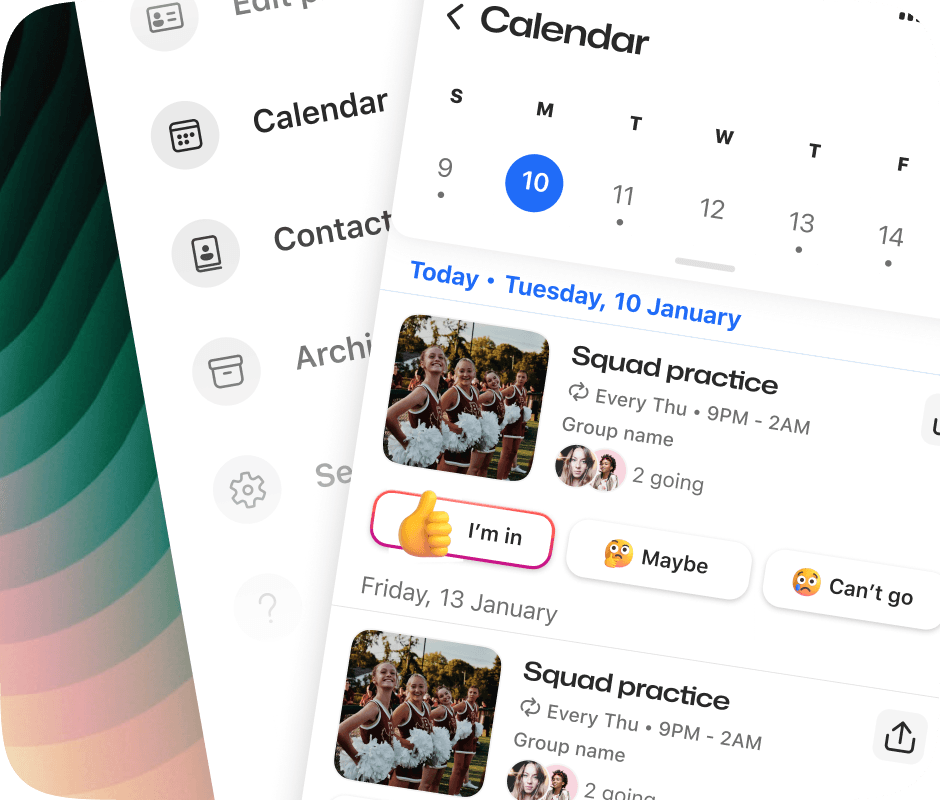
Your "My Calendar" lives under your Profile. Tap into it and you'll see every event you've been invited to or RSVP'd to across all of your groups, no more hopping between chats to piece your schedule together.
Here's what you can do from your Calendar:
See upcoming and past events you've been invited to in a clean, scrollable view.
Quick-access the group chat for any event, so you can jump into the conversation.
RSVP right from the calendar without opening each group individually.
Stay on top of your schedule with every invitation and RSVP in one spot.
Think of it like a master schedule for your GroupMe life. Team practice on Tuesday, book club on Thursday, family dinner on Sunday. It's all there.
How to Find Your Calendar
Open GroupMe and tap your Profile.
Tap Calendar to see the full view.
Browse upcoming events you've been invited to, or scroll back to see past ones.
Tap any event to RSVP or jump into the group chat.
That's it. No setup, no syncing. Every event you've been invited to or RSVP'd to is already there.
Recurring Events: Set It and Forget It
This one's been a long time coming. Recurring Events was one of the most requested features from GroupMe users, especially from sports teams, clubs, and any group that meets on a regular schedule.
Now you can create an event that repeats automatically. Weekly practice? Biweekly meeting? Every Saturday morning? Set it once and it keeps showing up, no need to remember to create a new event every week.
How to Create a Recurring Event
Open your group chat and tap to create a new event OR create an event group by tapping the {+}
Add your event details like title, date, time, and location.
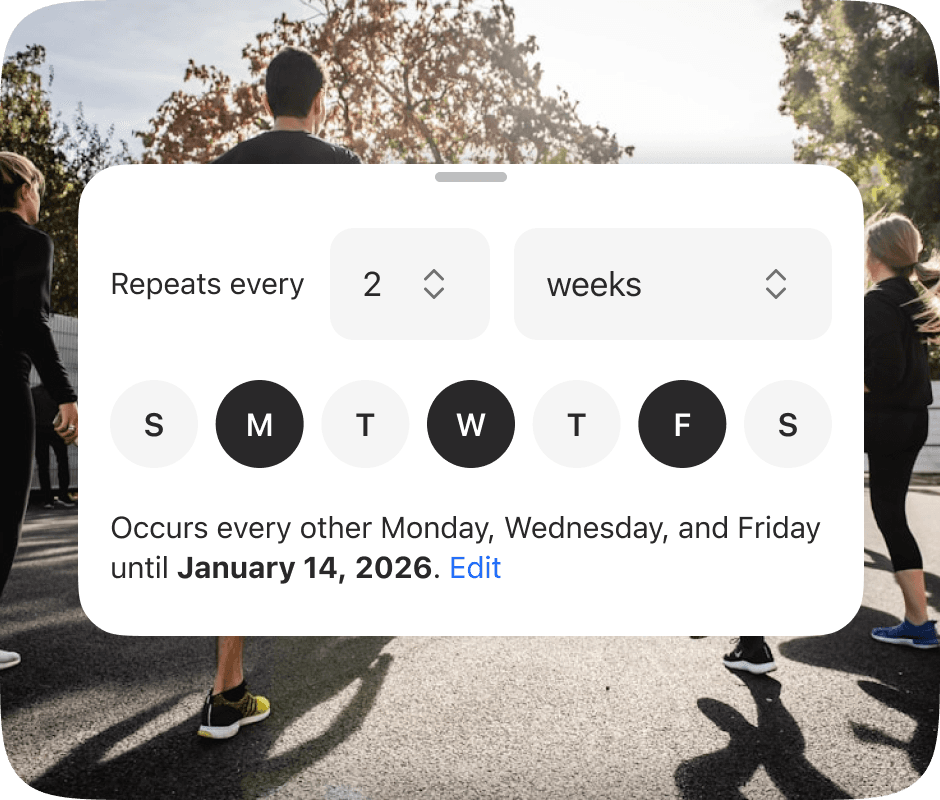
Tap the "Repeat" option to set a repeating schedule.
Use the day picker to choose which days and how often it repeats.
Tap "Done" The event will keep showing up on schedule.
The day picker keeps things simple. Choose your days, set the frequency, and let GroupMe handle the rest.
Why This Matters for Team Sports
If you've ever been the person responsible for sending out a weekly reminder to your team, you know it gets old fast. "Practice is at 6." "Same time, same place." Every. Single. Week.
Recurring Events takes that off your plate. Coaches, captains, club presidents, whoever's running the show can set the schedule once and move on. Everyone in the group sees the event, gets reminders, and can RSVP. No more chasing people down.
And with the Calendar, every member of the team can see what's coming up without asking. No more "wait, do we have practice this week?" messages.
Great for More Than Just Sports
Recurring Events works for any group that meets regularly:
Study groups that meet every Tuesday before exams.
Book clubs with a monthly meetup.
Church groups with weekly gatherings.
Friend groups with a standing game night.
Family with recurring Sunday calls.
Clubs and orgs with biweekly check-ins.
If your group has a rhythm, Recurring Events keeps everyone in sync without the busywork.
Built for the Whole Group
Just like every GroupMe feature, your personal Calendar and Recurring Events work across iOS, Android, and the web. Everyone in the group sees the same events, gets the same reminders, and can RSVP from wherever they are.
No one has to download a separate calendar app. No one has to sync anything. It just works, for the whole group.
Get Started
Both features are available now in GroupMe. Head to your Profile to check out your Calendar, or open any group chat to create your first Recurring Event. Set your schedule once and let GroupMe keep everyone on the same page.
Your groups already run on a rhythm. Now GroupMe keeps up.


